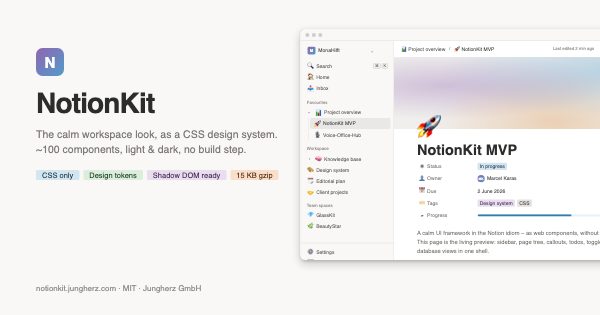
A calm UI framework in the Notion idiom – as web components, without a build step. This page is the living preview: sidebar, page tree, callouts, todos, toggles and database views in one shell.
💡
Core idea: NotionKit supplies the look and the shell; the editor is mounted through <nk-block-host> (BlockNote, say), and the data comes from your own API. Three layers, cleanly separated.
Everything else a Notion-like system needs – calm, drop-in elements. Try them out.
ℹ️ This page is a component preview – every element follows the same design tokens.
⚠️ The “Project overview” database has 2 overdue entries.
✓ All changes have been synced.
Inline elements
Running text can link SL Sara Lindt,
pages such as 📄 Knowledge base and dates such as
📅 20 May – and just as easily nk-database as code.
Emoji picker
😀🌿🍕🚀💡❤️🎲
Context menu (⋯)
Page
✏️Rename⌘⇧R
📋Duplicate⌘D
🔗Copy link⌘L
📁Move to …
🗑️Move to trash⌫
Page tabs
📝 Notes✅ Tasks📎 Files
Free-form notes on the project – meeting minutes, ideas, rough drafts.
Tasks for this project, linked to the database below.
Attached files and exports.
Template buttons
Stat cards
Active pages
128
▲ 12 this week
AI requests
847
▲ 23 %
Open tasks
14
▼ 5 since yesterday
Synced block
⟳ 3 places
Our mission: Take real weight off the working day – calm, clear, effective. This text appears identically on three pages and is maintained in one place.
Segmented control
For time ranges, perspectives or density levels.
Avatar group & presence
MKSLTW+2
5 people have access
Loading skeleton
Empty state
🗂️
No entries yet
Create the first entry or import existing data.
Comment thread
SL
Sara Lindt · 1 hr ago
The board view already feels very close to the original. 👍
✨
MonaKI · 20 min ago
I have flagged the overdue entries and prepared a summary.
AI assistant embedding
Summarise the open tasks for this project.
✨
Mona · KI
Two tasks are open: the Table-View sits at 65 % (due 20 May), the Board with drag and drop is planned. I would nail down the MVP scope first.
✨
What does integrating it look like?
One script tag is enough – no bundler, no framework lock-in:
The text editor itself. With <nk-block-host> only the optical shell – BlockNote or Novel is mounted as the editor. That keeps the kit lean and the editor replaceable.
✍️ Editor surface
From here on you are typing into real TipTap, mounted into an nk-block-host – with no editor CSS of its own. Hover a block for + / ⠿, drag it, select text, or type /.
This is no longer a preview: this paragraph is editable. The title above, the callout, the todos and the database are NotionKit markup – and this block is the same look, only alive.
Mount the editor into a block host
Move a block with ⠿
Pick a new block with /
NotionKit supplies the look and the shell, the editor supplies the behaviour. Three layers, cleanly separated.
 https://notionkit.jungherz.com